Neon City
Before and After Video. More Photos Below.

Original: A blocked off cave entrance at the beginning of the level. I thought it was too dark even though it was an area that was not able to be explored.

My Version: I increased the light from the glow sticks and added some light from the outside to accent the reddish/ orange with some purple.

Original: This is the starting hallway. overall it looked alright. it was dark in some areas and I thought it looked a bit dull.

Original: This is a glow stick that can be seen right at the start. it wasn't in the previous image and i wanted it to be known where the blue light in the corner was coming from.

My Version: I changed some aspects of the glow stick to give it more color using the LUT and added bloom to the light using Post Processing. I also added another glow stick further down the hallway.

Original: A wire that is throwing off sparks in the hallway.

My Version: I decreased lens flare so it wasn't as strong and let the LUT do the rest of the work with the color grading on the sparks.

Original: There was nothing to light up the scene here at first was a grate that was open but hard to see without light.

My Version: I added a red/ orange glow stick to the grate to light up the hallway and give better detail to the scene.

Original: The Lighting in this part wasn't necessarily bad. However, it was representing a lamp that had a cover over the top of it where the light was bleeding over/ through.

My Version: I took the Light and added an IES Light Profile and added it so that it would represent the lamp more.

My Version: This is the end of the hallway in my scene where I have the outside light casting shadows into the the hallway to light the final direction.

Original: This is located directly outside the first hallway. you can see the ocean and a tarp flying in the wind. There is a violet glow from a neon sign below and the cogs can be seen moving to the right.

Original: This is another angle of just exiting the Hallway. You can see parts of the city in the distance.

My Version: The colors in the scene now stand out more due to the LUT. There were more lights added below to cast shadows and light up the sign which will be seen in a few more photos.

Original: This seen was overly bright and the lens flare where huge. I also thought that the windows were easily overlooked because of the directional light.
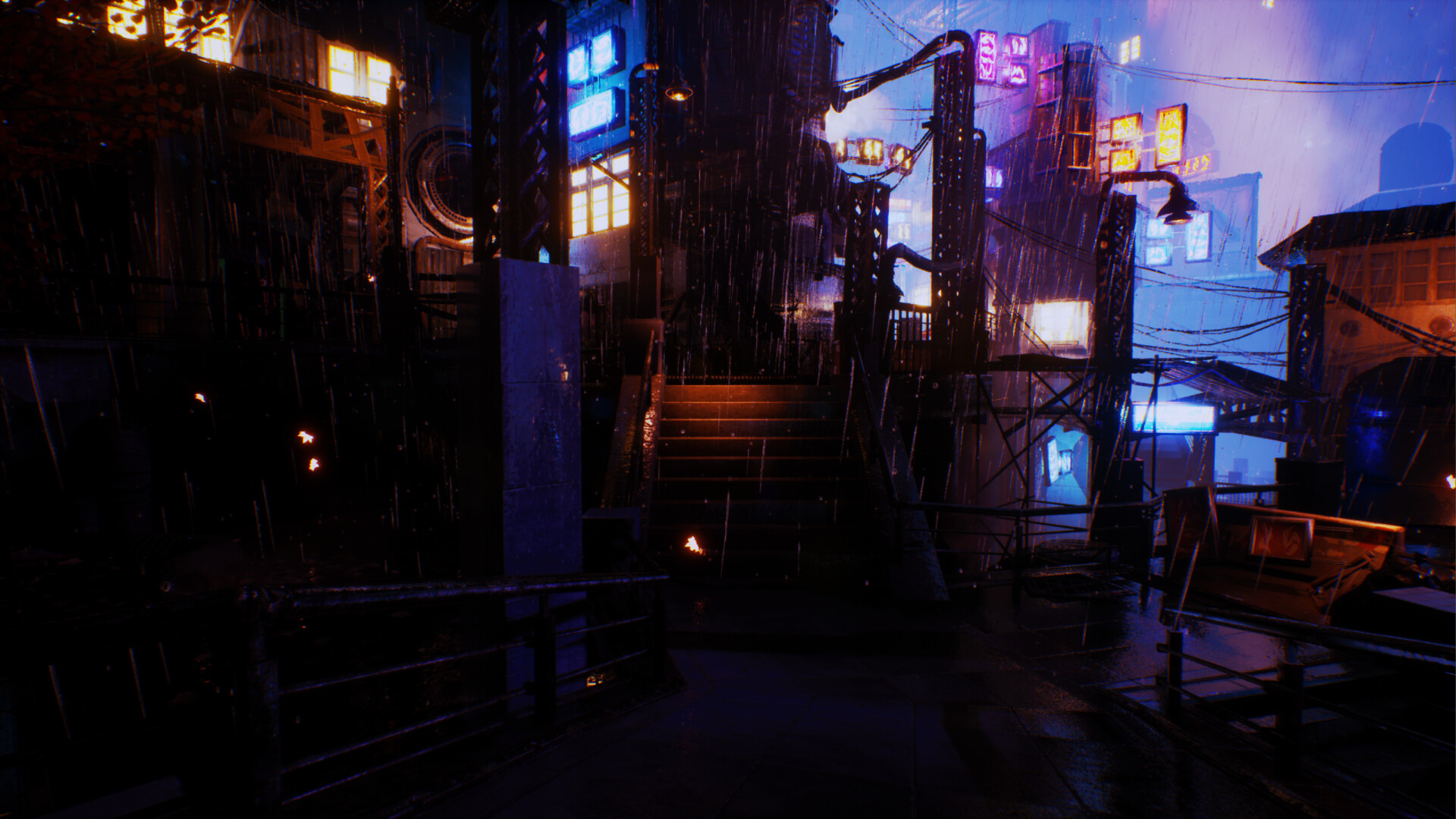
My Version: I toned down the overall brightness to the scene and made sure the emissive textures popped a bit more on the windows. I also made sure the lights coming off of the window and signs had shadows to cast out onto the walls and sidewalk.

Original: A blocked off intersection. it had some signs that were turned off. I thought that the directional light was enough to show that the path was blocked but the details of the objects blocking the path were almost impossible to see.

My Version: I added a street light and attached an IES Light Profile to it. I added some road blocks from the Megascans cyber punk pack and I turned on some signs in the background to add more light to the scene. Now the scenes details are more visible.

Original: This is the Violet sign that was shining outside of the hallway.

Original: This is another angle of the sign. The lens flares are strong and it makes it harder to see.

My Version: I made the LUT and post process made the sign stand out. I added two point lights to cast shadows. Then a rect light to make sure it shined through to the floor. Lastly I added a point light without shadows to add a soft violet to the shadows.

My Version: This a blockeed location just at the top of the stairs near the violet sign. I added a red glow from the windows and made the point lights on the neon sign cast shadows in the top right corner.

My Version: This is the view of what the window would look like. I used a rect light to point out and onto the sidewalk. It also casts shadows again the objects that lead to the door.

Original: This cuts back up to the blocked pass that was shown earlier. It showcases the signs that I focused on lighting up to add more detail.

My Version: I turned on the emmisve texture of one of the signs and then added lights to cast shadows. I used a orange point light to light up the silo a bit more. This helped with a contrast of orange and blue hitting both ends of the silo.

Original: This is close to the hallway that was first shown it is a view of some apartments. it overall looked flat besides the strong lens flares.

My Version: The windows and signs are now a stronger focous and light up the scene a bit more. I felt that it gives off a stronger late night feeling with a storm. The street lights also give off a soft glow and have IES profiles attached to them.

Original: This is at the top of the stairs. It contains a parts from the last photo in it. The colors overall felt dull and added very little to the scene. While the Lens flare made it almost impossible to look at anything.

My Version: I used most of the point lights on the windows and edited their values. I made the sign cast shadows and light up the walls more. A rect light was added to a window to light the wall and sidewalk. A point light was added to accent the ground.

Original: Following the path will lead to a covered and blocked door that has a sign on the left.

My Version: I added light to the sign so it could light up the wall. The lamp that is hanging got an IES Profile placed on it. I then added a green light that would show through the cracks of the door.

Original: This path leads to a dead end however there was still signs and windows that could be shown off better.

My Version: The sign on the left had more lights added to cast shadows and light up the wall. While the sign on the right had more girths to do the same. though it did have a window behind it which now has a soft glow coming from it.

Original: This is a bridge that continues on the path and goes into an area with a lot of windows and signs. The lens flare makes it hard to see most of what is in front of the camera.

My Version: The ground has more light from the street light. The signs on the building bring out more details and the windows help add some balance between all the colors. I also turned off all the windows on the top half of the building to add contrast.

Original: A view on the bridge that looks out to a part of the map that is blocked off. There are multiple windows and a lot of signs.

My Version: This is view that faces the bridge. It shows almost everything that can be seen from the previous shot.

My Version: This fallows a part of a blocked path bit I Thought the visual representation of the blue and orange mixing together looked good. it can also be seen later in the map at a different road block.

My Version: This is the blocked path continuing to a it's other blocked end. It is blocked by scaffolding.

Original: This is at the end of the bridge back on the normal path. The lens flares are intense and it makes it hard to see much. The sign that is visible is hardly lit.

My Version: Same location at the end of the bridge. It's much easier on the eyes. I added some assets from Kitbash 3D to the scene to fill it out more.

My Version: A view of the middle of the sidewalk. There is trash and contrainers spilling over onto the ground. The signs and windows are lighting the ground and mixing together.

Original: The middle of the sidewalk and looking up. An overhead bridge and a lot of windows with a few signs can all be seen above.

My Version: The windows on the upper half of the right building are turned off. I made the signs create more light to light up the walls. I also added a lamp to the right side of the bridge.

My Version: A wide view of the previous shot showing the full lights.

My Version: A closer view of the main building corner. The Blue, Violet, and Orange/ Red are all contrasting and mixing with each other. They cast good shadows and help light up details well.

My Version: A Medicine shop that was added in an asset pack. I added point lights to light up side bar lights on the building. I also added rect lights to make the sign on the right light bright pink, and have the red sign cast on the sidewalk.

My Version: A food stand that added to fill the scene. It also helped add more character to the scene and area. It also helped light small parts of the ground as well.

Original: Just past the main sidewalk there are some signs on a building. it was overall a bit dark in this area, but the colors although not as dull still didn't light up much.

My Version: I added more smoke particles to the vents. Then added more lights to signs to get more detail on the walls.

Original: A large Cog that is over a railing that is seen in the last image. The cog is moving but there isn't much emphasis placed on it. Even in a large city something like this should have some light on it.

My Version: I used some spot lights to light up the cog. I think it makes more sense that in a large city that has large layers that there will be lights everywhere.

Original: This is a path that comes to an end it is located to the right of the previous neon signs.

My Version: The windows light the ground and the scaffolding. The Lens flare isn't as strong, and the orange and blue lights from the signs mix.

My Version: Another angle of the last area.

Original: The lights ere fairly dull and there wasn't enough to get detail on the angled wall.

My Version: I added more blue lights to the neon sign above the camera. This let light hit the angle wall to get more detail. I added in a yellow light to go through the grate, but to also contrast with the colors and lead to the red which shows to go on.

Original: The red is lights do contrast with the blue behind the camera. The big issue is its saturation and the lens flares.

My Version: I added more point lights to the signs. Then rect lights were added to the window and facing the sign to add shadows and light to the ground. I also added to lights to the orange sign on the left.

Original: A head on look at the red lights. The light from the sign and window doesn't up the ground much. The lamp that's behind the camera is also lighting up the room more than it should be.

My Version: The rect light flows just barley into the next room but lights up the ground much more. The light that is behind the camera has an IES profile attached to it and still lights the room. The lens flares are also turned down but still visible.

Original: The stairway is dark and the signs are not giving off enough light. The angled hall behind the camera is also not lit at all.

My Version: The angled hall that was not lit. I added some soft point lights to the angled hall. This was to make it seem that the windows were partially lighting the hallway.
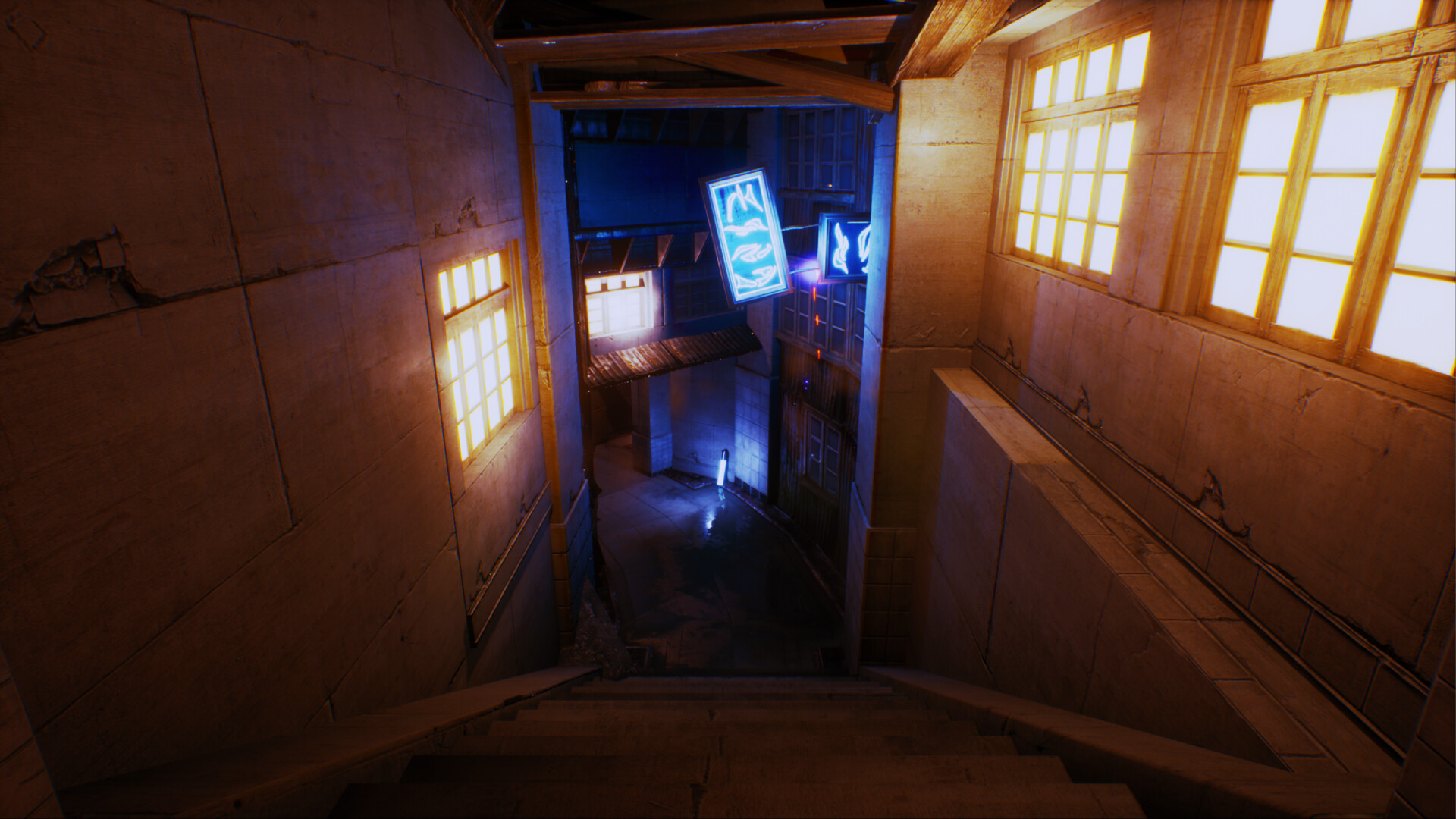
My Version: The windows have the emissive textures on. I added light to stairs as if it was coming from the window. The sign has more light and it lights up the walls more along with the glow stick on the ground.

Original: Bottom of the stairs that leads outside. There are sparks falling above the camera. The bottom is not light very well. There is not a lot of detail in the wall and it is hard to see.

My Version: The light from the window actually lights up the wall near it and lights part of the ground. The walls near the camera have more visible detail and the glow stick lights up the space more.

Original: The final stretch of the map there is little light here and it doesn't fit due to there being a sign and a window that have light coming from them above this path.

My Version: I added lights to the window and sign that shine down onto the path to make it better lit, and make more sense where the light is coming from.

Original: A boarded up door with a sign turned off. There is a light outside in the doorway but it doesn't cast any light. There is also smoke coming out of a grate that isn't visible due to the lighting.

My Version: I added a point light with an IES Profile and made it so the grate and smoke were visible. I also chose to leave the sign turned off so it wasn't as distracting.

Original: The window is lit up but there is no light on the wall and the sign has no light being made even though it's lit up.

My Version: I added point lights and rect lights to the window and the sign to make them cast more light and shadows. This definitely brought out more detail around the window and the walls near it.

Original: The sign on the left isn't as lit up and the colors are more dull. The lamp on the right wall also has no light besides a particle effect.

Original: The end of the original map. it's somewhat dark but there are lights that should be brighter.

My Version: I opened the gate and added lights to the lamp on the right wall and to the sign on the left.

My Version: A view of the stairs going down to the rock path.

My Version: A view from the top of the stairs looking back at the wooden gate.
Neon City is my relighting of the Soul City Slums from Epic Games Store. I left portions of the lighting in tact but still changed and edited the values to what I saw fit. I added assets from Kitbash 3D's Neo City free assets and I also used Megascans free cyberpunk assets. I thought the original city was too bright, dull and lacked shadows.
So, I went and fixed these. I took lights out and added lights in at different locations. I focused on the Neon Signs quite a bit, I tried making them light up the city for the most part. I also used the lights coming from some of the buildings to light up the path where street lights were not located. I also added in some Volumetric fog so all the lights would pop more. Then I made a LUT for the scene and edited the values to my liking. I added the LUT to the project and added some other Post Processing Effects to the scene to finish it off.

